- The Warning Score is a measure of confidence in the buffer chart’s accuracy. The more out of date the plan, the more likely the buffer chart is inaccurate.
- Higher score → lower confidence
- Lower score → higher confidence
/Playbook/Buffers/Warning%20Score/Warning%20Score%20-%20Overview.png?width=670&height=437&name=Warning%20Score%20-%20Overview.png)
- The Warning Score is calculated as follows...
- Warning Score = sum of points for out-of-date (OOD), unassigned, and unlinked tasks related to the Tracking Milestone.
- 1 point per each OOD task (Active & Planned) (once updated, they might move the milestone tracked on the buffer chart)
- OOD Active = Active task is not marked complete and end date is in the past
- OOD Planned = Planned task's start date is in the past
- 1 point per each unlinked (brown) task (once linked, they might move the milestone tracked on the buffer chart)
- 1 point per each unassigned task (once assigned, they might cause resource overloads on the critical path)
- Max OOD Active (e.g., if there are two OOD Active tasks, one is 5 days OOD and the other is 10 days OOD, the Max OOD Active = 10 points)
- Max OOD Planned (e.g., if there are two OOD Planned tasks, one is 5 days OOD and the other is 10 days OOD, the Max OOD Planned = 10 points)
- When you hover over the Warning Score, a tooltip shows the tasks contributing to it with the Critical & Near-Critical tasks displayed at the top.
/Playbook/Buffers/Warning%20Score/Warning%20Score%20-%20Contributors.png?width=670&height=395&name=Warning%20Score%20-%20Contributors.png)
In this example, for the Tracking Milestone = "Project Complete" the Warning Score = 37.
The following describes how the Warning Score is calculated.- Task title = "Service load UI onto units" is an Active, Near Critical task. It is 14 days OOD and unassigned.
- 2 points: 1 point for OOD + 1 point for unassigned
- Task title = "PRD/PDS work" is an Active, OOD task. It is 10 days OOD and unassigned.
- 2 points: 1 point for OOD + 1 point for unassigned
- Task title = "Determine test plan and strategy of rel centre cameras" is an Active task and is 13 days OOD.
- 1 point for OOD
- Task title = "TFC - Unified" is a Planned task. It is 10days OOD and unassigned.
- 2 points: 1 point for OOD + 1 point for unassigned
- Task title = "AI/ML improvements - Unified" is a Planned task. It is 8 days OOD and unassigned.
- 2 points: 1 point for OOD + 1 point for unassigned
- Task title = "Oil Inj MTX - Unified" is a Planned task and is 6 days OOD.
- 1 point for OOD
- Task title = "IRT + Phase 2 - Unified" is a Planned task and is 12 days OOD.
- 1 point for OOD
- The Max OOD Active task is 13 days OOD, contributing 14 points to the Warning Score.
- The Max OOD Planned task is 7 days OOD, contributing 12 points to the Warning Score.
- Therefore, Warning Score = 2 + 2 + 1 +2 + 2 + 1 + 1 + 14 + 12 = 37
- Task title = "Service load UI onto units" is an Active, Near Critical task. It is 14 days OOD and unassigned.
- In this example, after the contributing tasks were updated and the Warning Score = 0, the current position of the milestone on the buffer chart shifted from the orange into the red. Note: this won't always be the case, however, it demonstrates the importance of keeping the plans up to date and the Warning Score low.
/Playbook/Buffers/Warning%20Score/Warning%20Score%20-%20Warning%20Score%20=%200.png?width=670&height=447&name=Warning%20Score%20-%20Warning%20Score%20=%200.png)
- The Warnings List can be used to find and update the contributing tasks. Once you have opened the Warnings List, click the Warning List Settings icon to ensure the report is properly configured.
/Playbook/Buffers/Warning%20Score/Warning%20Score%20-%20icon%20and%20Settings%20icon.png?width=670&height=322&name=Warning%20Score%20-%20icon%20and%20Settings%20icon.png)
- Click Reset to deselect any unnecessary warnings and select the four warnings that contribute to the Warning Score.
/Playbook/Buffers/Warning%20Score/Warning%20Score%20-%20Settings.png?width=600&height=416&name=Warning%20Score%20-%20Settings.png)
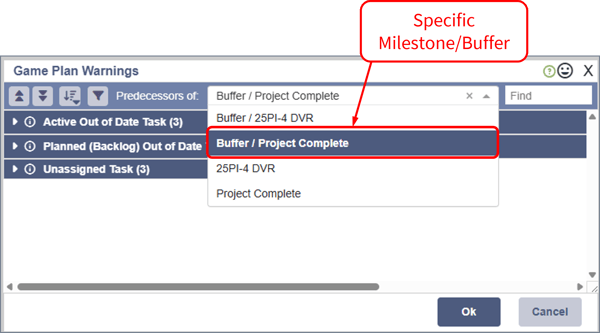
- The Warning Score shown on the buffer chart is specific to the chart's Tracking Milestone/Buffer. To only show the tasks contributing to that specific Tracking Milestone/Buffer, you must specify it in the "Predecessors of" drop-down list.
- The warnings are sorted in groups by warning type: Active OOD, Planned OOD, Unassigned, and Unlinked. They can also be sorted by criticality: Critical, Near Critical, Normal, and Unknown.
/Playbook/Buffers/Warning%20Score/Warning%20Score%20-%20Warnings%20List%20-%20Sorted%20by%20Group.png?width=600&height=570&name=Warning%20Score%20-%20Warnings%20List%20-%20Sorted%20by%20Group.png)
- There are several tools you can use to resolve the warnings.
/Playbook/Buffers/Warning%20Score/Warning%20Score%20-%20Warnings%20List%20-%20Resolve%20Options.png?width=600&height=582&name=Warning%20Score%20-%20Warnings%20List%20-%20Resolve%20Options.png)
- Need a hand? Contact a Customer Success Engineer today!
English
![Playbook Logo transparent.png]](https://playbookteam.com/hs-fs/hubfs/Playbook%20Logo%20transparent.png?height=49&name=Playbook%20Logo%20transparent.png)